Smart Doorbells: Are They Worth the Upgrade?
Author: Ryan Review by Home Remodel Guidance Editorial Team Review date First published Last updated Category: Home Upgrade Tips
A smart doorbell is worth it if you want to see and talk to visitors, watch for deliveries, and get alerts at your door, and you have reliable Wi-Fi at the front of the house. It is less useful if your signal is weak, you do not want cloud video, or you would rather not pay for a storage plan. Wired models need a compatible transformer.
Part of the series: Upgrading Your Home for Energy Efficiency: Where to Start
A smart doorbell is a doorbell with a camera, microphone and speaker that connects to your Wi-Fi and sends alerts to your phone. It is one piece of a larger home security plan, and it also fits into the wider set of connected systems described in our energy and smart home guide. This page answers one question: is it worth buying and installing one?
Are smart doorbells worth it?
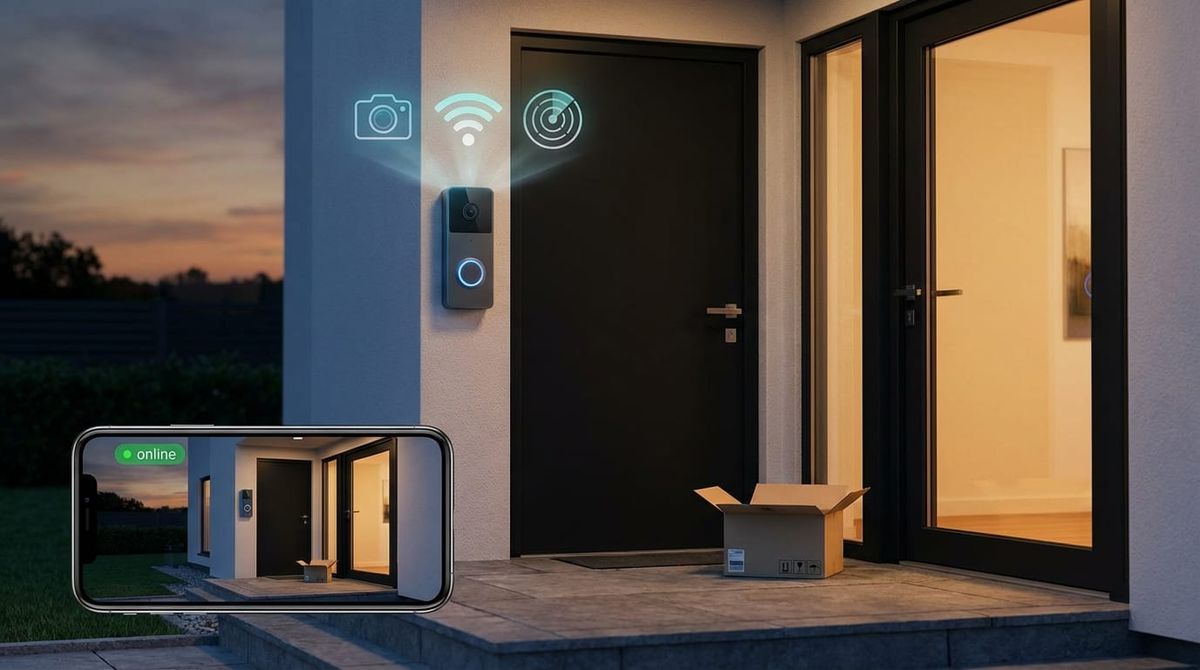
They are worth it for people who want to know who is at the door without opening it, to see packages arrive, and to talk to visitors from anywhere. The benefit is awareness, not protection: a doorbell camera does not lock a door or stop a break-in on its own.
The strongest cases are:
- Deliveries and visitors: you get an alert and a clip, even when you are away.
- Accessibility: you can answer from a phone, a smart display or a chime without going to the door.
- Records: video can help document an incident if you need to report one.
The weakest cases are homes with poor Wi-Fi at the front entry, owners who do not want cloud-stored video, and anyone who would be annoyed by constant motion alerts. Check each product’s subscription terms before buying, because features such as longer video history often depend on a paid plan. We have not listed plan prices because they change.
Wired or battery: which power source should you choose?
Wired is best when your existing doorbell wiring and transformer match the maker’s specification. Battery is best when you rent, the wall is masonry, or the wiring is missing. The table above compares your options.
Wired doorbells
A wired model draws power from the transformer that already feeds your doorbell, so there is nothing to recharge. Each maker publishes a voltage and VA range. Ring lists 8 to 24 VAC for its battery doorbells and the Video Doorbell Wired, and 16 to 24 VAC for its Pro and 2K or 4K wired models, with minimum ratings of 5 to 10 VA depending on the model. Google lists 16 to 24 V AC and 10 to 40 VA for the wired Nest Doorbell.
If the transformer has no label, Google says it is considered incompatible, and you can test the voltage with a multimeter after disconnecting the old doorbell. Where the transformer does not meet the spec, you can have a professional upgrade it or use a plug-in power option where the maker offers one.
Battery doorbells
Battery models mount on the wall or door frame with screws or adhesive, so they are the simplest to install. You trade that for periodic recharging or battery swaps. Many makers also let you trickle-charge from low-voltage wiring, so check supported ranges first.
How do you install a smart doorbell safely?
Treat it as an electrical job even though the voltage is low. The transformer is usually connected to household wiring, and Ring says to disconnect power at the circuit breaker or fuse box before starting.
- Turn off the breaker that feeds the doorbell transformer, then confirm the old doorbell is dead.
- Read the transformer label for voltage and VA. If it is missing, stop and call an electrician.
- Photograph the old wiring before disconnecting anything.
- Follow the manufacturer’s instructions for chime adapters, diodes or kits.
- Mount at the maker’s recommended height and angle for the camera’s field of view.
- Restore power and test the button, chime and app.
Ring warns that incompatible power sources can damage the device and cause electric shock, and notes that an electrician may be required in some areas. If the transformer is inside a panel or attic, or you are adding a new one, hire a licensed pro. Our guide to electrical work and DIY limits explains where the line sits.
Will your existing chime still work?
Not always. Some wired models keep the old mechanical chime with an adapter, while others bypass it. Ring says the existing chime is bypassed and will no longer sound on several wired models, so you need a Ring Chime or an Alexa-enabled speaker. Google says the Nest Doorbell needs the included chime connector, and a chime that runs only on batteries is not compatible.
Decide how you want to hear the bell before you buy: a phone alert alone is easy to miss, so many households add an indoor chime or smart speaker.
What should you check before you buy?
Match the doorbell to your door, network and household rather than to the longest feature list.
- Wi-Fi at the door: test your signal at the exact mounting spot with your phone. A weak signal causes delays and missed alerts.
- Power: confirm your transformer voltage and VA, or choose battery.
- Field of view and mounting: check whether the camera covers the porch floor for packages. A wedge kit helps with angled walls.
- Storage and plans: find out what works without a subscription and what does not.
- Ecosystem: if you use a particular smart home app, confirm the doorbell works with it. Matter, the standard supported by Apple Home, Google Home, Amazon Alexa and Samsung SmartThings, lists cameras and doorbells among its device types, but check each product’s own support. See smart home integration for wiring and ecosystem planning.
- Door hardware: a doorbell does not make a weak door secure. If your entry door is old or damaged, see replacing a front door.
How do you keep a smart doorbell private and secure?
Secure the account and the network, and be considerate about what the camera sees. CISA’s guidance for smart devices is simple.
- Change the default password and use a unique one.
- Check app permissions and say no to requests that make no sense.
- Put smart devices on a separate network if your router supports it.
- Turn on automatic updates.
On privacy, aim the camera at your own entry, review whether you want audio recording, and learn your local recording rules. Laws vary by state and city. If a tenant or neighbor is involved, a short conversation avoids most problems.
What are the pros and cons of a smart doorbell?
The main advantages are awareness and convenience, and the main drawbacks are dependence on Wi-Fi, accounts and sometimes a subscription.
Pros
- See and speak to visitors from your phone, whether you are upstairs or away.
- Get motion and package alerts without a separate camera system.
- Wired models never need charging.
- Many models connect to chimes, smart speakers and displays.
Cons
- Features and video history may depend on a paid plan.
- Video lives in a company’s cloud unless the product offers local storage, so read its privacy terms.
- A weak Wi-Fi signal at the door makes it unreliable.
- Wired models are limited by your existing transformer and chime.
- Motion alerts from a busy street can be noisy until you adjust the zones.
Who should skip a smart doorbell?
Skip it, or choose a non-cloud option, if you cannot get a reliable Wi-Fi signal to the door, you share an entry with neighbors who object to recording, or your main concern is the door itself. A strong, well-fitted door and quality locks do more for security than a camera. For a full plan that covers doors, windows, lighting and alarms, see our guide to modern home security upgrades.
Renters should read the lease first and prefer a battery model with a mounting method that can be removed without damage.
Smart doorbell or something else?
A doorbell is one of several entry-point upgrades. If your main worry is the area around your house after dark, outdoor lighting often adds more day-to-day safety. If you want a tour of connected products beyond the front door, read our guide to smart home devices that improve daily life.
| Power option | Best for | Watch for | Install difficulty |
|---|---|---|---|
| Wired to existing doorbell transformer | Homes with working doorbell wiring; no battery charging | Transformer voltage and VA must match the model; chime may need a bypass or adapter | Moderate; low-voltage but breaker off first |
| Battery | Renters, brick or stucco walls, homes with no wiring | Recharging or swapping batteries; check the maker's battery-life notes | Easy; screws or adhesive mount |
| Battery plus trickle charge from existing wiring | Wired doorbell homes that want a backup | Check the maker's supported voltage range | Moderate |
| Plug-in or indoor power adapter | Transformer too weak or missing | Cable routing to the door | Moderate; may need an electrician for a new transformer |
Choose wired if your doorbell wiring and transformer already meet the maker's specs: you never recharge it. Choose battery if you rent or the wiring is missing or too weak. If the transformer fails the spec, replace it with a compatible one or use the plug-in power option rather than forcing it.
FAQ
Are smart doorbells worth it?
They are worth it if you want live alerts, two-way talk and a record of visitors and deliveries, and your Wi-Fi reaches the front door reliably. They are less useful when the signal is weak or when you object to cloud-stored video. Check whether the features you want need a paid subscription, and compare the one-time hardware cost with any ongoing plan before you buy.
Do I need existing doorbell wiring to install one?
No. Battery-powered models mount with screws or adhesive and need no wiring. A wired model uses your existing doorbell wires and transformer, so it needs a transformer in the voltage range the maker lists, for example 16 to 24 V AC for the wired Nest Doorbell. If your wiring or transformer does not meet the spec, use a battery model or the plug-in power option.
What voltage does a smart doorbell need?
It depends on the model. Ring lists 8 to 24 VAC for its battery doorbells and the Video Doorbell Wired, and 16 to 24 VAC for its Pro and 2K or 4K wired models, with minimum ratings of 5 to 10 VA. Google lists 16 to 24 V AC and 10 to 40 VA for the wired Nest Doorbell. Always check the label on your transformer and the maker's current specification.
Will my existing chime still ring?
Sometimes. Some wired models keep an existing mechanical chime with a small adapter, while others bypass it. Ring says the existing chime is bypassed and no longer sounds on several wired models, and you need a Ring Chime or an Alexa-enabled speaker to hear a ring. Google says the Nest Doorbell requires its included chime connector, and battery-only chimes are not compatible.
Is it safe to install a doorbell myself?
Doorbell circuits are low voltage, but the transformer is often wired to household current, so switch off the circuit breaker first. Ring tells installers to disconnect power at the breaker or fuse box and warns that incompatible power sources can damage the device and cause electric shock. If you cannot find the transformer, or it is unlabeled, hire a licensed electrician.
Can smart doorbells be hacked?
Any internet-connected device can be targeted, which is why basic hygiene matters. CISA says changing the default password is one of the most important steps, and recommends checking app permissions, keeping software updated with automatic updates turned on, and considering a separate network for smart devices. Use a unique password and, where the app offers it, two-factor authentication.
Do I have to tell visitors they are being recorded?
Rules differ by state and city, and audio recording is regulated more strictly than video in many places. Point the camera at your own entry rather than at neighbors' windows or yards, review the audio settings, and consider a small sign. If you are unsure, check your state's recording laws or ask a local attorney, because this page cannot give legal advice.
Sources
- Ring: Guidelines for Hardwiring Your Ring Video Doorbell (ring.com)
- Google Nest Help: Nest Doorbell wired requirements (support.google.com)
- CISA: Internet of Things tip sheet (cisa.gov)
- Connectivity Standards Alliance: Matter (csa-iot.org)
Related articles
- Upgrading Your Home for Energy Efficiency: Where to Start
Start with an energy audit, then air sealing, insulation, HVAC, water heating and windows. Includes the status of the federal tax credits.
- Planning an Eco-Friendly Renovation from Start to Finish
Plan an eco-friendly renovation: energy assessment, air sealing, efficient systems, water savings, low-VOC materials, waste and tax credit status.
- Whole-Home Automation: Control Systems, Hubs and Protocols Compared
Compare whole-home automation systems: ecosystem hubs, Home Assistant and pro-installed Control4 or Lutron, plus Matter, Thread, Zigbee and Z-Wave.
- Smart Home Integration During a Renovation: What to Pre-Wire and Plan
Plan smart home integration in a renovation: what to pre-wire while walls are open, how to pick an ecosystem and Matter devices, and how to stay secure.
- Indoor Air Quality Upgrades for Healthier Living
Improve indoor air quality with upgrades ranked by what works: source control, ventilation, MERV 13 filters, air cleaners, humidity and radon testing.
- Eco-Friendly Building Materials: What to Choose and How to Verify
Compare eco-friendly building materials by category and learn which labels are real: ENERGY STAR, WaterSense, GREENGUARD and the TSCA formaldehyde rule.